Ring outdoor camera placement and setup for adventure parks
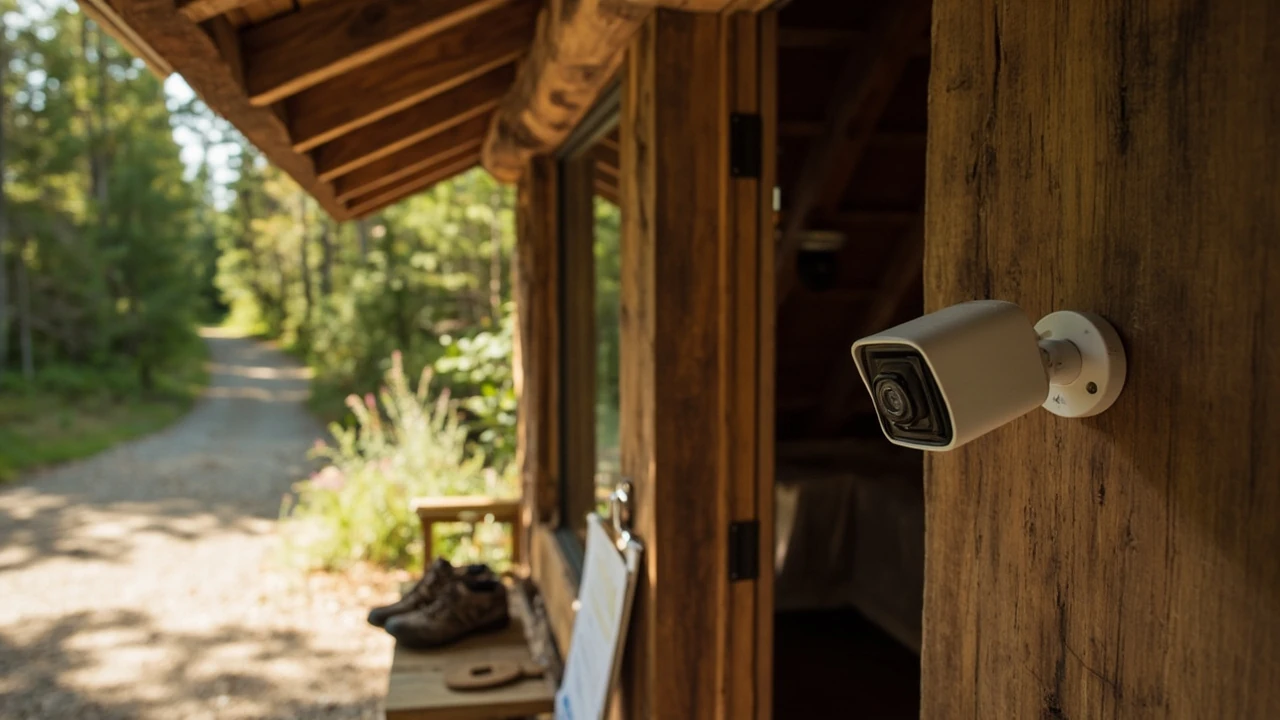
A camera is only as useful as where you put it. On a high ropes site, a forest trailhead, or a small adventure park, a ring outdoor camera can replace a clipboard at the gate, give staff a second set of eyes near the belay area, and let a manager check a locked shed from home. It can also create blind spots, false alerts, and privacy problems if it is mounted without thinking about lines of sight, lighting, and the people moving through the site.
What follows is a working method for planning a ring outdoor camera installation around a real outdoor activity site, from a one-camera gate setup to a small network covering parking, briefing zones, and equipment storage. The logic borrows from the way ropes-course safety and trail-day logistics are usually planned, because the questions are similar: where do people gather, where do they slow down, and where does a small problem grow without anyone noticing?
Ring outdoor camera placement for a ropes park or trail site
The first decision is not which model to buy. It is where the camera actually has to see something useful. On a forest site, the most valuable views are almost always the same: the car park entrance, the briefing area, the main access gate, the equipment shed, and any zone where a guest could get into difficulty without being seen from the base.
Walk the site during a normal busy day and note where staff keep stopping to look. That pause means a gap. A ring outdoor camera placed at roughly the same height as a standing adult, with a clear line of sight, usually covers more ground than a unit mounted high on a tree for the sake of looking impressive.
Match the camera angle to the activity zone
Different zones need different fields of view. A wide-angle entry shot is useful for arrivals, but it loses detail at the belay deck. A focused shot of the gear-up area keeps faces and harnesses legible, which matters when a manager needs to confirm who was on a course at a specific time.
A workable placement plan for a small site is to combine one wide overview with one or two focused views. The overview gives context, the focused shots give evidence.
Common blind spots on forest and trail sites
Trees, signs, and rope structures block more view than people expect. A camera pointing along a path is fine; a camera pointing at a path from sixty degrees away will mostly catch bark.
Before drilling any holes, hold a phone screen at the planned mounting spot and walk through the scene on the app’s live view. It is the cheapest way to catch a branch that will move into frame in wind, or a sign that will backlight the subject at noon.
Power, network, and weather choices
Most ring outdoor camera models are designed for mains power, a rechargeable battery pack, or a solar add-on. Each option has trade-offs on a rural site where a power socket is rare and Wi-Fi is patchy.
| Power option | Best site situation | Limitations to plan for |
|---|---|---|
| Rechargeable battery | Remote gate, tree-mounted views, sheds without power | Needs a routine to swap or charge; cold weather reduces run time |
| Wired mains | Reception building, briefing hut, anywhere with a socket | Requires routing a cable and weatherproofing the entry point |
| Solar panel | South-facing fence post, parking entrance, sunny gate | Output drops in winter and during heavy cloud; still needs the original battery |
| PoE adapter on a network drop | Cabins or offices already wired for data | Only useful if the site already has structured cabling |
For network, a ring outdoor camera expects a stable 2.4 GHz Wi-Fi signal. On a forest site, a mesh node near the gate is often the difference between a clean live view and a device that drops off the app every afternoon.
It helps to do a simple signal test before buying. Stand at the mounting point with a phone on the same Wi-Fi band and run a speed test. If the result is poor, plan for a mesh extender or a wired backhaul first; cameras cannot fix a bad link.
Mounting height, angle, and visitor privacy
Mounting height controls two things: how much of the scene fits in the frame, and how identifiable the people in it are. Too high and faces become caps. Too low and the camera becomes a target for visitors, branches, and weather.
- Around 2.2 to 2.6 metres is a working range for most gate and parking views.
- Aim slightly downward so the lens is not staring at the sky, which washes out detail in bright conditions.
- Avoid pointing directly at a public footpath, neighbouring property, or a clearly private area like a staff break room.
- Use the privacy zones feature to black out windows, neighbouring driveways, or the inside of a shed door.
- Post a small, factual sign at entrances so visitors know recording is in use. This is required in many jurisdictions and is a normal expectation in the UK and EU.
For an adventure park or rope course, a ring outdoor camera should be aimed at the things that matter operationally, not at the activities themselves. The aim is safety, accountability, and lost-property resolution, not filming a zipline for content.
Activity zones worth covering first
If a site can only afford two or three cameras, the priority list is fairly consistent across small adventure operators.
| Zone | Why it matters | Camera angle to use |
|---|---|---|
| Car park entrance | Vehicle evidence, arrival flow, late departures | Wide, slightly elevated, looking along the road |
| Briefing and harness area | Where instructions are given and fitted gear is checked | Eye level, focused on the briefing spot |
| Main access gate | Who came in, who left, and when | Head-on, with enough distance to see full bodies |
| Equipment shed | Loss prevention, lost property, after-hours access | Cover the door and the wall it opens against |
| Rest or picnic area | Useful for first aid follow-up and the rare complaint | Wide, from a corner mount, with privacy zones on any play area |
This mirrors the same logic used in the daily plan from How to Plan a Family Rope Park Day Around Age and Height Rules, where the most useful coverage is at the points where information changes hands.
Connecting the camera to daily operations
A camera that records into a cloud account no one checks is a decoration, not a tool. On a working site, the ring outdoor camera is most useful when it feeds into the routines that already exist.
- Briefings: the morning briefing can include one quick check of the previous day’s gate footage if there were any issues.
- Lost property: a timestamped clip is often faster than descriptions over the phone.
- Incident reviews: after a minor first-aid event, the manager can review the relevant window without pulling staff off the course.
- Staff safety: a late-working team member can confirm the car park is empty before walking out alone.
For a practical view of how these small details add up, the planning approach in How to Build a Realistic Day Trip Budget shows how daily routines quietly shape the bigger operational picture.
Reducing false alerts on a busy outdoor site
Movement alerts are the most common reason a ring outdoor camera ends up ignored. A camera pointing at a tree will ping every windy afternoon, and staff stop trusting the app within a week.
The fix is not to silence alerts. It is to draw the activity zones more carefully, so the camera only reacts to the kinds of movement that matter on a real day at the site.
- Define an activity zone that covers the gate or path, not the surrounding trees and sky.
- Exclude busy background areas such as a public footpath or a road with regular traffic.
- Lower sensitivity in zones where staff or guests move slowly, like the harness area.
- Use person-only detection if the subscription supports it, to cut down on small animals.
- Review the alert log weekly for a month and adjust the zones based on what actually triggers.
After a few passes, the camera will mostly alert when a person is at the gate or in a zone that should normally be empty, which is the entire point of having it.
Weather, seasons, and routine maintenance
An outdoor camera takes more abuse than a domestic doorbell. Rain runs down the lens, pollen dusts the housing, and winter cold shortens battery life. A small routine keeps the picture clean and the device reliable.
- Wipe the lens cover with a soft cloth every month, and more often after pollen or dust events.
- Check seals around cable entries before the autumn rain starts, especially on wired installations.
- Test the live view from a phone on a cold morning to confirm the battery is not dropping too fast.
- Trim back any growth that has crept into the frame, because vegetation is the usual cause of new glare or new blind spots.
- Keep a spare battery or a small solar panel in the parts store so a unit can be revived quickly.
These tasks line up with the seasonal checklist approach used in Rope Park Weather: Rain, Wind and Closure Questions to Ask, where small checks before a season save bigger repairs during it.
Data, retention, and the law in plain language
A ring outdoor camera records people, including children, in spaces that are not always private. The exact rules depend on the country, but the underlying principles are similar and worth following as a default. The UK Information Commissioner’s Office publishes straightforward guidance on using CCTV for legitimate purposes, and that kind of public-body explainer is worth reading before any outdoor install.
- Only record what is needed for safety, security, and operations, and tell visitors that recording is in use.
- Point cameras away from homes, public toilets, changing areas, and inside any building where people expect privacy.
- Use the shortest reasonable retention window. A subscription plan that keeps footage for thirty to sixty days is usually enough for incident review without storing months of personal movement.
- Restrict app access to staff who actually need it, and use two-factor authentication on every account.
- Have a simple written process for handling a request from a visitor who wants their face blurred in a clip.
This is a sensible baseline even where the law is lighter, because it keeps the camera focused on the operational purpose rather than on general surveillance.
Working examples from real site layouts
It helps to look at how a small number of cameras can cover a typical weekend site without overlapping or leaving gaps. The layouts below are not blueprints, but they show how the priorities above translate into a real placement plan for two common site shapes.
| Site type | Camera 1 | Camera 2 | Camera 3 (optional) | What this covers |
|---|---|---|---|---|
| Single-field rope park with a car park across the road | Main gate, head-on, 2.4 m | Car park entrance, wide, on a post | Equipment shed door | Arrivals, departures, after-hours shed access |
| Trailhead with a small briefing hut | Briefing hut porch, eye level | Trail start marker, wide from a tree mount | Staff vehicle parking | Briefing compliance, who went in, late returns |
| Forest adventure course with separate picnic area | Main access gate | Harness-up zone, focused | Picnic area corner, with privacy zones | Gate control, harness checks, first-aid follow-up |
Each layout assumes one mesh node near the gate or hut, a sign at the public entrance, and a written rule that staff do not share clips outside the operator group. The exact camera model matters less than sticking to the same placement logic across the site.
Common installation mistakes to avoid
Most failed ring outdoor camera installs on outdoor sites fail for the same handful of reasons. None of them are expensive to fix once spotted, but they are easy to miss on a first walk-through.
- Mounting the camera above a roofline that creates a heavy shadow on the path in the morning.
- Aiming the lens across reflective surfaces like a polished car bonnet or a wet sign.
- Relying on a single Wi-Fi router in a distant cabin for a gate that is 80 metres through trees.
- Skipping the sign at the entrance because the site feels small enough not to need one.
- Letting a solar panel sit in the shade of a sign or a branch that grew over it during the season.
A second walk-through about a week after the first install, in different weather, usually surfaces at least one of these issues. It is worth doing before the camera becomes a permanent fixture.
A small, useful first installation
For a brand new site, a one-camera setup is often the right starting point. The goal is to learn what the camera is actually good at, instead of guessing and ending up with five poorly placed units.
A sensible first plan is one ring outdoor camera at the main access gate, running on a rechargeable battery, with a small sign at the entrance, and a phone or tablet on the office wall showing the live view. After a month of normal use, the team will have a clear sense of whether the angle, the power, and the alert behaviour match the day-to-day reality of the site. That feedback is what should drive the next camera, not a checklist.
Operators who skip this step and bolt on three more cameras in the first week usually end up moving all of them within a month. A slow start tends to give a more useful final layout.
Frequently asked questions
How high should a ring outdoor camera be mounted at a park entrance?
Around 2.2 to 2.6 metres is a working range. It is high enough to be out of casual reach and to clear most heads in the frame, but low enough that faces are still identifiable at the gate. Going much higher reduces the chance of recognising anyone without adding real coverage.
Can a ring outdoor camera run on battery through a UK or northern European winter?
It can, but the battery will drain faster in cold weather, and shorter daylight hours reduce the benefit of a solar panel. Plan to charge the battery more often in midwinter, or run a wired mains supply to the most important gate so the camera is not affected by temperature at all.
Will a ring outdoor camera work with a weak rural Wi-Fi signal?
It will connect, but live views and alerts will be slow or patchy. On a forest site, a mesh Wi-Fi node near the gate, or a wired backhaul from the main building, usually gives a much more reliable result than relying on the router inside a distant cabin.
Where should a ring outdoor camera not be pointed?
It should not be pointed at a neighbour’s home, inside a public toilet or changing area, into a private garden, or along a public footpath where there is no operational reason to record passing members of the public. Use the privacy zones feature to block those areas, and add a sign at the entrance so visitors know recording is in use.
How many cameras does a small rope park actually need?
Two to four well-placed units cover most small sites: one at the gate, one at the briefing or harness area, one covering the equipment shed, and optionally one in the car park. More cameras do not necessarily mean better coverage if the original placements were poor.
Is a ring outdoor camera enough for incident evidence?
For a lost property query, a quick check of who left a jacket behind, or a basic time-stamped view of the gate, it is usually enough. For a serious incident, it is one piece of evidence alongside staff reports and any existing safety logs, not a replacement for them.
How do I stop a ring outdoor camera alerting on every passing animal?
Tighten the activity zone to the path or gate itself, exclude the surrounding vegetation, and turn on person-only detection if the plan supports it. After a couple of weeks, the alert log will show what is still triggering and the zones can be refined again.
What is the simplest first step for a brand new installation?
Mount one camera at the main gate on a rechargeable battery, add a sign at the entrance, and watch the live view from a phone for a month. That real use is the best guide for where the second and third cameras should go.
Does a ring outdoor camera need a subscription to be useful on a small site?
Without a subscription, the camera still shows a live view and records locally on some models, but features like person-only detection, longer clip history, and rich notifications are usually locked behind a plan. For a working site that depends on the camera for incident review, the subscription tends to pay for itself in saved staff time.
Can a ring outdoor camera be shared across multiple staff phones safely?
Yes, through shared user access on the app, with two-factor authentication turned on for every account. Avoid sending clips over personal messaging apps, because that quickly breaks the chain of custody for any clip that may later be needed as evidence.
Related reading
Explore High Ropes Adventure
Trip tools
Essential adventure planning guides
Use these practical guides to compare rope park activities, prepare for a first high ropes day, check a booking, choose suitable footwear and contact the editorial team. Each page links to the relevant live tools and current planning sections.
Latest articles
- Ring outdoor camera placement and setup for adventure parks
- Blink outdoor camera: a practical guide for property monitoring
- Outdoor bar ideas: design, layout, and practical choices
- Tate McRae tickets: how to find, compare, and buy seats without the stress
- Tame Impala tickets: how to find them, what they cost, and what to know before you buy
- Outdoor pillows: how to choose the right ones for a deck or trail rest stop
- How to find Morgan Jay tickets without overpaying
- How to find national parks near me: a practical local search guide
- Paylater travel: how buy now, pay later works for trip bookings
- Bagsmart Blast Travel Backpack: A Practical Review for Day Trips and Adventure Days